
Introduction
This article will explore what linear referencing is, how it's used, and how FME can help.
What is a Linear Referencing System?
A linear referencing system (LRS) is a method for storing assets and characteristics based on their relative positions along a line. To use proper terminology, linear referencing uses measures to locate events along a route. Think of it like an addressing system, or a spatial reference system, that uses measurements rather than absolute coordinates.
In the example below, the “Hwy 6” sign (a point) is an event located at a distance of 2.1 km along the route. The fence (a line event) starts at a measure of 2.0 km and continues for 0.8 km. The events that occur along the route are stored in an event table, which organizes the data and makes it easy to query.
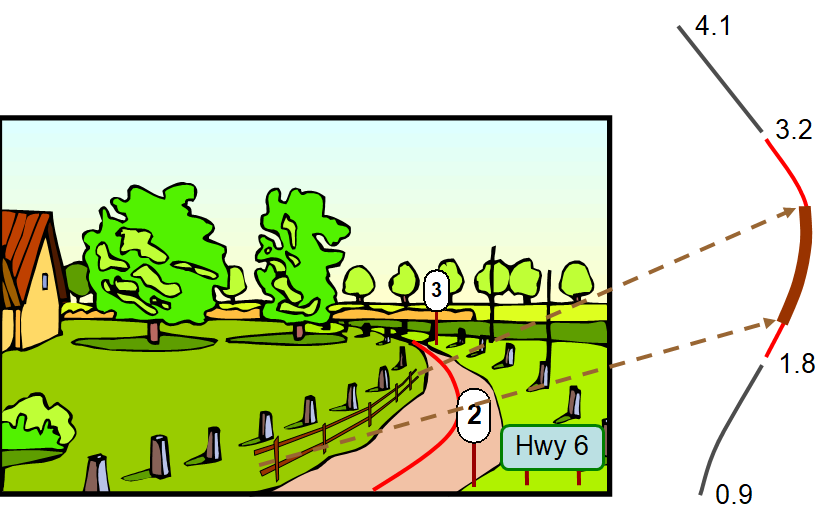
How is it used?
With the ability to easily manage the characteristics of linear features and related assets, LRS is popular across industries that work with linear infrastructure. Common applications include:
- Transportation - recording signs, mile markers, or other features along a route
- Transit or freight - monitoring real-time movement
- Energy - storing, processing, and displaying information about oil and gas pipelines
- Utilities - managing pipeline GIS models
The key advantage is storing relative positions rather than absolute ones, which makes updates, comparisons, and event lookups much simpler.
How Can FME Help?
FME is a no-code authoring environment to create all data workflows. It utilizes transformers that can perform spatial analysis on all feature types. Below are some extremely useful transformers for linear referencing.
Snipper
The Snipper transformer shortens linear geometry by cutting off the ends. It is used to segment a line to indicate a characteristic change. The Snipper transformer lets you enter a start and end location to segment your line.
Example: A highway is segmented to indicate a change in speed limit.
For more information on the Snipper transformer, please refer to its documentation.
MeasureGenerator
The MeasureGenerator transformer can create measures on a linear feature. This is often the first step to linear referencing as it prepares the line by assigning values to be used as a reference for incoming events.
Example: MeasureGenerator is used on a line representing Hwy 6 to indicate its start measure (0 km) and end measure (25 km). Events like stop signs can now be expressed in these terms (5 km mark).
For more information on the MeasureGenerator transformer, please refer to its documentation.
MeasureExtractor
The MeasureExtractor transformer returns the measure value of your event.
Example: MeasureExtractor is used to locate a stop sign (5 km away).
For more information on the MeasureExtractor transformer, please refer to its documentation.
MeasureSetter
The MeasureSetter transformer modifies, shifts, or replaces measures on an existing referenced feature.
Example: MeasureSetter converts Hwy 6's measures from kilometers to meters by scaling all measures by 0.001.
For more information on the MeasureSetter transformer, please refer to its documentation.
MeasureRemover
The MeasureRemover transformer removes measures from a feature.
Example: MeasureRemover is used to clean up geometry before exporting.
For more information on the MeasureRemover transformer, please refer to its documentation.
LengthToPointCalculator
The LengthToPointCalculator transformer calculates the length of a feature from its start until the closest spot to a point.
Example: A large tree may not fall directly along Hwy 6, but it was calculated to be 10km along the road.
For more information on the LengthToPointCalculator, please refer to its documentation.
StraightLineDiagrammer (FME Hub)
StraightLineDiagrammer is a custom transformer created by Safe Software. It creates a straight-line diagram of a linear feature rather than its natural shape. For more information on the StraightLineDiagrammer, please refer to its documentation.
MeasureExpressionEvaluator (FME Hub)
MeasureExpressionEvaluator is a custom transformer created by Safe Software. It evaluates expressions on measure values, including algebraic operations and conditional statements. For more information on the MeasureExpressionEvaluator, please refer to its documentation.
MeasureCalibrator (FME Hub)
MeasureCalibrator is a custom transformer created by Safe Software. It transfers the measures from nearby points to the nearest line location, then fills in the remaining line measures based on those point measures. Measures between two points are interpolated, while points beyond the endpoints are extrapolated. For more information on MeasureCalibrator, please refer to its documentation.
Summary
Linear referencing provides an efficient and intuitive way to manage assets and events tied to routes. When integrating LRS data with other datasets in FME, the right transformer makes all the difference — whether you're generating measures from scratch, segmenting a route, or calibrating against real-world reference points. Together, these tools make it straightforward to move between a segmented data model and a fully referenced route-and-events structure.